
Cheap shared subscription to kling
Kling AI lets you turn a product image into an animated scene or test visual proposals before producing a campaign. On CuentasGO you can check cheap accountsand evaluate the available options according to the balance, duration and features you need to finish your videos.
Cheap Kling: how to pay less and make the most of Kling AI credits
Kling exceeded 60 million creators and 600 million videos generated in December 2025, according to Kuaishou. For those preparing ads or social content, the challenge is turning those attempts into usable pieces. Savings are measured per finished video.
A scene may look good until the camera moves and the product changes shape. Then comes another attempt, another correction and a new deduction from the balance. That’s why finding cheap Kling requires looking at more than the monthly fee: how much it costs to resolve the scene you need and what the access you buy actually includes.
Cheap Kling: which option truly makes sense
Start by defining the piece: a product rotating on a table, a person walking or a scene with dialogue present different challenges. Choose the configuration by the shot, rather than always using the most complete one.
To test an idea, look for a configuration that lets you assess composition and movement at an affordable cost. When you need to keep a character consistent between shots or coordinate sound and image, compare the model-specific tools available. Paying more only adds value if it solves a project need.
Before expanding access, test three representative scenes and record credits, attempts and valid results. A flashy generation can hide problems that will appear across the rest of the campaign. This test reveals whether the tool fits the full job.
Kling belongs to Kuaishou and offers different model families. Model, generation mode and membership are different concepts: a name like Video 3.0 identifies technology; a mode describes how a task is executed; membership determines your account access and terms.

Kling AI pricing: app, API and third parties
You can work from the official interface, integrate the service via API or use a provider that offers its models. Comparing their prices requires equalizing the task and understanding how each channel bills.
Modality | What you pay for | What must be clear |
|---|---|---|
Official web or app | Membership or available credits | Balance, expiry, features and renewal |
API | Usage according to the contracted rate | Billing unit, configuration and applicable charges |
Intermediary service | Their own plan or balance | Model used and equivalence of their units |
Third-party access offer | The advertised modality | Account control, duration and usable balance |
Credits from two providers are not necessarily equivalent. An offer with more units may allow fewer generations if its consumption per task is higher. Compare the same video example and the final amount with taxes, currency and renewal.
How official plans and credits work
Credits represent usage capacity, but they do not by themselves describe a fixed number of videos. Before generating, check the consumption shown in the interface for the model, duration and selected options. Also check when each type of balance expires or is replenished.
A credit package is useful if you can spend it during the available period. Balance that expires unused is also part of the cost. Do not take a higher quota just to accumulate units if your monthly production is small.
Note separately included credits, extras purchased and promotional balance. That way you can distinguish recurring spending from a temporary benefit and calculate how much it will cost to repeat the project next month.
When Kling’s API can be worth it
The API may interest you if you integrate generations into an app or need to run batches through a technical flow. For a few manual pieces, first assess whether the interface solves the work without additional development.
Automation also requires supervision. You must manage requests, download results, review failures and prevent a process from repeating tasks indefinitely. Include those costs when comparing the API with a membership.
Use a defined scene as the comparison unit: same model, input, duration, audio and resolution. If a rate corresponds to another provider or configuration, do not present it as Kling’s direct price.
What explains differences between providers
A service may include storage, editing tools or support that another charges separately. Versions of the model and billing systems can also vary. Check what you will receive for that amount, not only the Kling name on the listing.
If you buy third-party access, confirm whether you’ll receive a full account or shared credentials, how much balance you can use and who manages the user. A third-party access offer is not necessarily equivalent to buying credits for your personal account.
Can you use Kling AI for free?
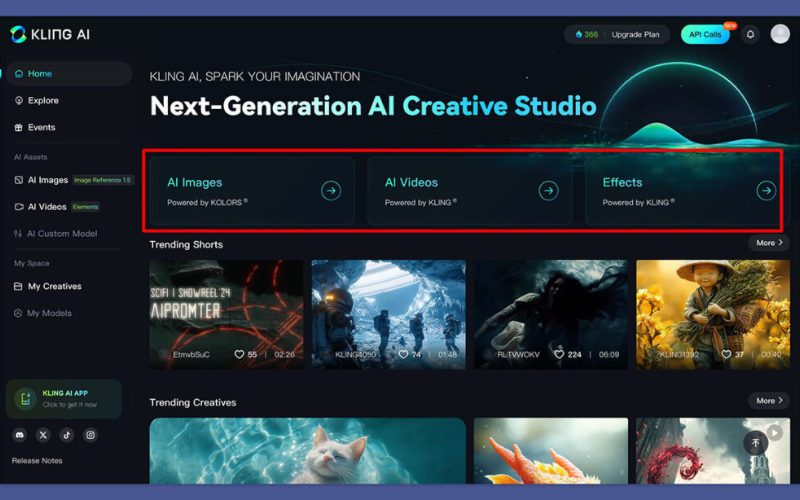
Check whether your account has free access, a trial or promotional credits. Conditions can change; do not assume a daily amount or permanent duration if it is not stated in the service.
Use the trial to answer a specific question: if the tool preserves the look of your reference, executes the movement or produces an appropriate file. For a commercial assignment, also review the download and usage terms before producing the whole piece.
How to use Kling AI for free from the web
1. Go to the official website and create an account.
2. Check balance, expiry and available features.
3. Prepare a simple scene with a main action.
4. Review the expected consumption before generating.
5. Evaluate the result and note the reason for each discard.
For the first test, you can animate an image with a gentle camera move. Avoid combining too many actions: if the result fails, it will be easier to identify what to adjust.
Kling AI APK: what to check before downloading
Use download links from the official service or a recognized store and verify who publishes the app. Do not enter payment details into a copy whose origin you cannot confirm.
An installer does not guarantee additional credits. Promises of unlimited balance or unlocked paid features do not replace the real terms of an account and are not a reliable basis for budgeting a project.
How to calculate the real cost of a video
For a subscription, you can start with these relations:
Theoretical value of a credit = period price ÷ usable included credits.
Cost of an attempt = credits consumed × credit value.
Cost of a valid take = expense of attempts ÷ usable takes.
Illustrative example, not related to an official rate: you pay 20 euros for 1,000 credits and each attempt consumes 50. The theoretical value is 0.02 euros per credit and each generation costs 1 euro. If you need four attempts for a valid take, that take costs 4 euros.
Example result | One valid take | Five valid takes |
|---|---|---|
One attempt per take | €1 | €5 |
Two attempts per take | €2 | €10 |
Four attempts per take | €4 | €20 |
Budget for discards from the start. In a campaign with several scenes, multiplying the cost of the first attempt by the number of shots often falls short. Also account for revisions requested after approving a version.
If you pay the €20 in the example and only use 200 credits before the rest expire, the outlay is still €20. To evaluate the whole project, allocate that amount among the pieces finished during the period, not against a balance you will no longer use.
Price per second versus cost per video
Price per second is useful when you know the billing unit and minimum conditions. A short generation does not guarantee a proportional cost if the provider bills by segments or by task.
Also check whether the file duration solves the shot. A short clip that you must regenerate because the action is incomplete may be less efficient than a sufficient duration from the start. The goal is to deliver the scene, not to reduce seconds at any price.
Which Kling model is cheapest by use
There is no single winning model for all scenes. Kuaishou announced Video 3.0 and Video 3.0 Omni with advances in references, continuity and audiovisual generation. Test the capability your project needs and confirm its availability on the contracted channel.
To test ideas and publish on social media
In the sketch phase, validate subject, framing and movement. A simple scene lets you compare results without introducing dialogue, camera changes and multiple actions at once.
Instruction example: “A jar on a light table. The camera zooms in slowly. The jar stays still and retains its shape. Soft side lighting.” Define what changes and what must stay the same. It is more useful for assessing a take than a long list of adjectives.
For ads, products and commercial use
In an ad, examine the product frame by frame: shape, color, label and proportions. An attractive result stops being useful if it alters a detail the client needs to show faithfully.
Prepare an approved reference before animating it. Check framing, lighting and visible elements; if the initial image contains an error, adding more motion does not necessarily fix it. For texts or logos that must remain exact, consider incorporating them in editing.
For native audio, lip sync and multi-take scenes
The Video 3.0 family includes native audio and multi-take narrative capabilities, according to Kuaishou’s announcement. Their usefulness depends on the assignment and the access contracted; not all scenes require those options.
If you need a specific voice or will change the narration, compare generating the movement and adding the sound afterward. Separate tests when it makes corrections easier. You can consult ElevenLabs on CuentasGO if you need to evaluate an additional voice tool, taking its cost and terms into account.
For dialogue, check synchronization, pronunciation and continuity between shots. If sound is part of the final result, include it in the budget test rather than leaving it as an unforeseen extra.
How to spend fewer credits without worsening the result

Reducing spend starts before you press Generate. Write what must happen in the shot and what criterion you will use to approve it. Then organize tests instead of changing instructions at random.
- One main action: avoid asking for several transformations and movements at once when starting.
- One variable per revision: adjust camera, action or reference to identify what improves the result.
- Clean reference: use an image with reviewed composition and details.
- Approval criteria: decide which errors force a discard and which can be edited.
- Version record: keep instructions, adjustments and consumption of the useful takes.
If the scene works and you only need to trim the start, editing can avoid another generation. For assembly, subtitles or format adaptation, you can compare CapCut on CuentasGO options with the tools you already use.
Reserve margin for client corrections. Agreeing composition and movement on a draft before producing the final version reduces late changes. It doesn’t guarantee less consumption, but it makes the process more predictable.
Kling versus Sora, Veo and Runway: is anything cheaper?
To compare, give the same reference and the same objective to the tools you have available. Evaluate fidelity, movement, editing work and cost to reach an approved take.
Compare by resolved scene, not by a promotional demo. A result can be economical for environments and inefficient for products with precise details. If you check Runway, review the plan and its terms before comparing amounts.
Avoid keeping multiple subscriptions just to try similar features. First verify which one solves your recurring scenes and buy extra capacity when there is a concrete need.
Privacy, watermark and commercial use
Before uploading client material, check the terms of the chosen channel and who can access the account. Do not assume individual privacy on a shared access: history, references and results may not be isolated.
Confirm whether the plan allows the intended use, what watermark it adds and how files are managed. The service’s authorization does not replace permission to use images of people, music or third-party elements.
For confidential material, use a modality compatible with the client agreement. Do the first tests with your own or authorized references that do not reveal sensitive information.
Create more usable pieces and adjust your budget with CuentasGO
A campaign may require animation, editing and voice, but you don’t always need to pay for all those tools for a year. If the work is concentrated in a few weeks, hire capacity for the production period and calculate which part of the budget corresponds to each task.
When evaluating a Kling offer on CuentasGO, ask how much balance you will be able to use, when it expires and what happens if there are other users on the account. Those details help know whether you can complete your shots: a cheap access is little use if credits run out before finishing the campaign.
Delivery time also matters. If you must start tomorrow, confirm when you will receive access and how incidents are handled. Compare the cost for the same period with direct contracting and review the specific support and refund terms.
Choose by the pieces you need to deliver. Check Kling availability and complementary tools, avoid duplicating subscriptions and buy when you have clear balance, duration and access modality. That way you can focus spending on producing and correcting the material you will publish.
