
Cheap shared subscription to Adobe Captivate
Adobe Captivate lets you create professional eLearning courses, interactive software simulations, demo videos and assessments with smart branching — all without needing to be a programmer. Here you can find cheap Adobe Captivate accounts with original licenses, immediate activation and technical support.
Cheap Adobe Captivate: price, courses and alternatives
Searching for cheap Adobe Captivate often mixes very different offers: licenses, courses, enterprise plans, trials and authoring tools that cover different needs. That’s where an apparently inexpensive option can stop being economical.
A course doesn’t necessarily include the program, and an individual license may be insufficient if several people will create or update content. But at CuentasGO we have everything covered, because we work with the best providers on the market, who guarantee accounts without downtime and provide warranties in case of any issue.
Adobe Captivate is used to create interactive e-learning courses, especially for corporate training, demonstrations and guided practice on applications. Instead of focusing only on the initial price, it’s important to evaluate what content will be produced, where it will be published and how long the team will need to use the tool.
What is Adobe Captivate and what is it for?
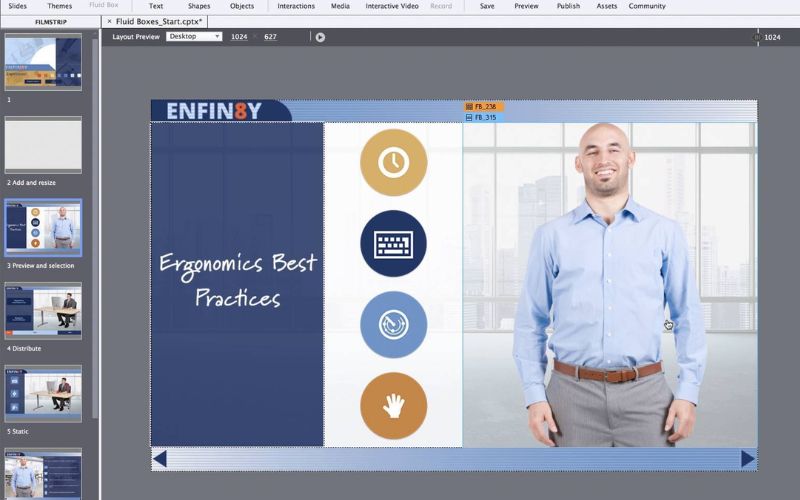
It is an authoring software specialized in developing online courses, software simulations, demo videos, branched scenarios and assessments that can be easily published to any LMS (Learning Management System) or as standalone files.
Unlike PowerPoint, MasterClass or conventional video editors, the program is designed for effective learning experiences. That is, it enables interactive content with intelligent logic that includes:
- Branching based on user responses.
- Auto-graded quizzes.
- Detailed progress tracking.
Additionally, it has full compatibility with SCORM and xAPI, which are essential for learning platforms to record completion, time spent and user performance.
Main features of Adobe Captivate
Once you choose an Adobe Captivate account on CuentasGo, you unlock all these features:
- PowerPoint to eLearning conversion: import existing presentations and turn them into interactive courses, preserving text, images and animations to edit within Captivate.
- Software simulation: record the screen to create step-by-step demonstrations of how to use a system or application, with automatic captions.
- Responsive courses by default: content adapts automatically to desktop, tablet and mobile without having to layout each version separately.
- Interactivity: auto-gradable quizzes, scene branching based on learner responses, variables and widgets.
- Collaboration: review and comments within the project itself, useful when multiple people participate in content validation.
And because it’s versatile, it allows multi-platform publishing, including export compatible with SCORM, xAPI and HTML5 to integrate with virtually any LMS on the market.
What you are comparing when looking for cheap Adobe Captivate
For someone who only needs to create a single module, “cheap” may mean a one-off license or a simple solution. A company that maintains a training catalogue will also need to consider the number of authors, updates, support and production work behind each course.
The budget is not limited to the software. It’s wise to separate license, training, maintenance and publishing before comparing options. That avoids deciding only by Adobe Captivate’s price and later discovering unforeseen costs.
Licenses, subscriptions and Adobe Captivate for Teams
Adobe Captivate prices vary depending on the commercial modality available, the number of users and the applicable terms at a given time. An individual license covers one author’s work. Adobe Captivate forTeams is aimed at organizations that need to manage access and users centrally.
When requesting a quote, check what the plan actually includes:
• Number of licenses and authorized users.
• Subscription duration or purchase conditions.
• Updates, support and renewal.
• Included features.
• Permitted use on corporate machines.
An enterprise e-learning license provides access to the software, but it does not create the courses by itself. If the team doesn’t know how to design interactions, simulations or e-learning quizzes, the tool can be underused for months.
Training: online course, FUNDAE-subsidized training and certifications
The cost of learning the program varies as much as the license does. Someone already working in instructional design may only need to learn publishing, variables or Captivate’s workflow. A department starting from scratch usually benefits more from practical training tied to its templates, processes and LMS.
An online course on this platform can be enough to master basic functions. When several corporate modules must be produced, it’s more useful to work with real content: creating an internal onboarding is not the same as simulating an invoicing application.
FUNDAE-subsidized training can also come into play. A subsidized course can reduce the company’s cost if it meets requirements, although available credit, documentation, delivery modality and processing times are involved. It is not an automatic discount.
Also distinguish between a certificate of completion and a certification. Before enrolling, know who issues the certificate, which program version it covers and what value it will have within the organization.
What Adobe Captivate is used for
Adobe Captivate is an e-learning authoring toolto create courses with navigation, multimedia, assessments and interactive elements. It is used for internal training modules, LMS-tracked content and application demonstrations.
A linear lesson with text, images and a basic assessment can be handled with a lighter solution. Captivate makes sense when the learner must practice a process, make decisions or progress through a guided path.
Software simulations and screen recording
Software simulations are one of Adobe Captivate’s most recognizable uses. In training on an invoicing program, a presentation can show where each button is. The simulation adds practice: the learner follows the steps and receives guidance if they make a mistake.
Screen recording also allows documenting processes, creating internal tutorials or teaching application use. From that capture you can develop demos with navigation, activities and assessments.
These features are more valuable when there are multiple modules to maintain or specific procedures to teach. To publish a single explanatory video, a tool focused on capture and editing may be more appropriate.
Regarding Adobe Captivate’s AI, do not assume a given feature will be available in all versions or plans. AI capabilities change quickly. If they are decisive for purchase, verify them in the product available.
Publish a SCORM course and validate LMS compatibility
Exporting the file does not finish the job. The course must work in the environment where students will take it and record the necessary information.
LMS compatibility depends on the authoring tool, the platform configuration and the chosen standard. The most common are SCORM 1.2, SCORM 1.4, AICC and xAPI. Depending on the LMS, the data stored about grade, attempts, time on task, progress or completion may vary.
Being able to export HTML5 also matters, especially if the course will be accessed from mobile devices. That a module opens in the browser does not guarantee that audio, navigation, quizzes or tracking will behave the same on all devices.
The most useful test is to upload a short module to the real LMS. Include an interaction, a video and an assessment. If progress or the expected grade are not recorded at the end, the problem will appear before producing the full course.
Adobe Captivate 2019, Classic and later versions
You can still find tutorials and syllabi focused on 2019. They can help learn concepts like slides, variables, screen capture or publishing, but they do not always reflect current licenses, features or interfaces.
The difference between Adobe Captivate Classic and later versions can affect workflow, technical requirements and how interactive content is built. A course based on an older edition may not teach the same options a user will find in a recent version.
Before hiring training or buying a license, check:
• The exact version used in the course.
• The operating system and hardware requirements.
• The support and update status.
• Compatibility with the company’s LMS.
• The ability to reuse legacy projects, templates and assets.
This also affects older ecosystem tools like Adobe Presenter. The existence of documentation does not mean they are the best choice for a new course.
Alternatives to Adobe Captivate by project type

Alternatives to Adobe Captivate do not all compete under the same conditions. Some prioritize rapid creation; others, cloud collaboration, PowerPoint integration or video production. The choice depends on the type of course to deliver.
Tool | Best for | Strength | Aspect to validate |
|---|---|---|---|
Adobe Captivate | Simulations and application training | Screen capture and advanced interactions | Publishing to the corporate LMS |
eXeLearning | Basic courses on a tight budget | Free and open source | Required interactivity and design |
Articulate 360 | Teams with recurring production | Variety of tools and resources | Subscription cost and review process |
iSpring Suite | Presentation conversion | PowerPoint integration | Needs beyond that format |
Camtasia | Recorded tutorials and video | Screen capture and editing | LMS tracking if there is assessment |
Lectora | Complex, highly customized projects | Advanced authoring | Learning curve and configuration |
EasyGenerator or Elucidat | Teams collaborating from the browser | Shared cloud production | Features included in each plan |
Coursebox AI | Fast creation with automated assistance | AI-supported workflows | Export and available options |
The table helps narrow options, not replace testing. Version, plan and target LMS can change the outcome.
eXeLearning for simple courses and limited budgets
eXeLearning is a free option for projects with very tight budgets. It allows organizing content, adding resources and activities, and preparing materials for learning environments.
It does not require a commercial license, though it offers fewer resources for complex simulations, automations, advanced templates or specialized support. It can fit a basic SCORM course on prevention, onboarding or general procedures.
If the goal is to reproduce in detail the use of an enterprise application, it may fall short.
Plans and price of Adobe Captivate
Although with the subscription purchased on our platform you save a lot of money, it’s useful to check official prices so you can compare what you save on our platform:
Plan | Price | Includes |
|---|---|---|
Individual | US$39.99/month | Adobe Captivate (new), Adobe Captivate Classic, 100 GB storage, 25 generative credits monthly |
Teams (Teams/VIP) | Custom quote | Everything above + 700 premium generative credits monthly, unlimited credits for Image Generate and Text Generate, admin console |
Enterprise (ETLA) | Custom quote, 3-year contract | Same features as the Teams plan, with centralized licensing and predictable annual payment |
Education | Preferential rate | Discount subject to academic eligibility; the institution manages the purchase and it is not always available to individual students |
Adobe discontinued the perpetual license (one-time purchase) in February 2022. Today Captivate is only available by subscription; there is no longer an option to “buy it once and keep that version forever.”
How to choose software to create courses
The decisive criterion is actual use. A powerful tool makes sense if it facilitates production and maintenance of the courses the team will publish. For simple, one-off content, that complexity may be unnecessary.
These situations help narrow the search for course authoring software:
• For corporate training with an LMS, first validate the publishing standard and result tracking.
• For a simple SCORM course, eXeLearning or another basic tool may suffice.
• Software simulations justify a solution like Adobe Captivate or an equivalent alternative.
• If material starts from presentations, a tool integrated with PowerPoint avoids reconstruction work.
• For a one-off project, compare the license cost with outsourcing production.
• Teams that publish frequently usually need reusable templates, collaboration and manageable maintenance.
Total cost includes script, design, voiceover, review, updates, testing and corrections. Publishing two linear courses a year does not demand the same needs as maintaining a product training library.
Accessibility also matters. Requirements such as WCAG 2.0 or Section 508 affect captions, contrast, keyboard navigation and assessment design. The important thing is to check how the published content looks, not just that the program mentions accessibility options.
The best way to buy a cheap Adobe Captivate account
There are some smart ways to get the software at a much more reasonable price without risking your investment on a pirated license that Adobe could deactivate at any time.
- Buy a legal, inexpensive subscription at CuentasGO: our platform offers reliable subscriptions, no downtime and direct provisioning from the vendor. In addition, you have ongoing support and personalized assistance if you have activation problems.
- Educational licenses: if you are at a university or educational institution, discounts can reach up to 40% through the VIP Select program for education. Many universities offer licenses for less than $80 USD per year.
- Volume licenses for teams: Adobe’s Value Incentive Plan (VIP) applies tiered discounts. For commercial teams, discounts start at 3.5% and can reach up to 25%.
- Annual vs. monthly subscriptions: The $39.99 monthly price is for the monthly plan. If you choose the annual plan, the effective cost is significantly lower.
- 30-day free trial: Adobe offers 10 free generative credits during the trial period, allowing you to explore all features before committing to a purchase.
Where to get these prices? Platforms like ours manage volume licenses with VIP discounts, and many universities have tech stores where students and staff can purchase licenses at institutional prices.
