
Cheap shared subscription to Suno
Give sound to that lyric you’ve been saving or try different musical versions for your next content. With affordable Suno you can explore voices, rhythms and arrangements from a written idea, without starting each proposal from scratch. In the CuentasGO shared accounts platform you can compare Suno offers and choose the access that fits your project and budget.
Affordable Suno: how to pay less and choose the right plan
A lyric you’ve saved, an idea for your channel or a melody to present a project: Suno turns text prompts into songs with voice and instruments. Paid plans expand creation and publishing capabilities.
You know the emotion a song should convey, but you don’t yet know how it would sound. With Suno you can try an acoustic version, change the tempo or explore a Spanish lyric until you find a direction that convinces you. The tool makes that first step easier; the result still requires listening and judgement.
Searching for affordable Suno starts with a practical question: do you want to experiment or do you need to export music from the platform for publication? Generating songs and downloading them are distinct capabilities. That difference affects which plan suits you and how much you’ll ultimately spend.

What is the cheapest way to use Suno?
The free plan lets you start without paying a subscription. You can explore styles, test lyrics and hear how it interprets your instructions. It’s a good way to discover whether the tool responds to what you’re looking for before buying more capacity.
Savings change when you need to export the result or use it in a commercial project. Free has download limits and does not include commercial usage rights. The free plan is useful for exploration, but does not cover all publishing goals.
If you already produce content continuously, compare paid options according to your generation and download needs. A low fee is of little use if you exhaust the resource you need to finish your deliveries.
Suno plans: Free, Pro and Premier
Comparing plans should include credits, downloads and editing features. Credits let you generate and work with content; downloads determine how many songs you can export under the corresponding quota.
The official pricing page shows these capabilities as of the article review in October 2026. Check your account conditions before paying, since features may change.
Plan | Credits included | Song downloads | Use to consider |
|---|---|---|---|
Free | 50 per day | No monthly quota; limited trials depending on availability | Explore styles and create for personal non‑commercial use |
Pro | 2,500 per month | 20 per month | Create and publish at a moderate volume |
Premier | 10,000 per month | 60 per month | Work with more variants and Studio tools |
Suno distinguishes song downloads from exports via Studio: its policy announces an exception to limits for Premier users working in Studio. Confirm which export applies to your project; do not interpret that exception as unlimited downloads across all areas.
Suno Free: when the free plan is enough
Free fits when you are still learning how to write prompts and assess results. You can try a song with vocals, listen to another instrumental version and check which description brings the piece closer to your idea.
Learn to describe what you want to hear. Instead of asking only for “a nice song,” specify the mood, instruments, tempo and the language of the lyrics. For example: “calm acoustic pop, guitar and soft percussion, lyrics in Spanish and a short chorus.”
You don’t need to get it right on the first try. Use trials to detect what works and what you would correct. If later you want to use a song in an ad, a monetized video or deliver it to a client, first review the paid option and its commercial terms.
Suno Pro: to publish with some frequency
Pro makes sense when you already know the tool and need more room to generate versions and download chosen pieces. It’s an option worth reviewing for recurring projects with a moderate publication volume.
Estimate the attempts needed to get a usable piece. Maybe one version gets the vocals right but the chorus doesn’t fit; another may have the right arrangement and need lyric tweaks. Those trials also consume capacity.
Also think about final downloads. If you prepare a series of videos, count how many songs you’ll need to export from Suno and check whether the quota covers you. Having credits available does not mean you can keep exporting without limit.
Suno Premier: for a high creation pace
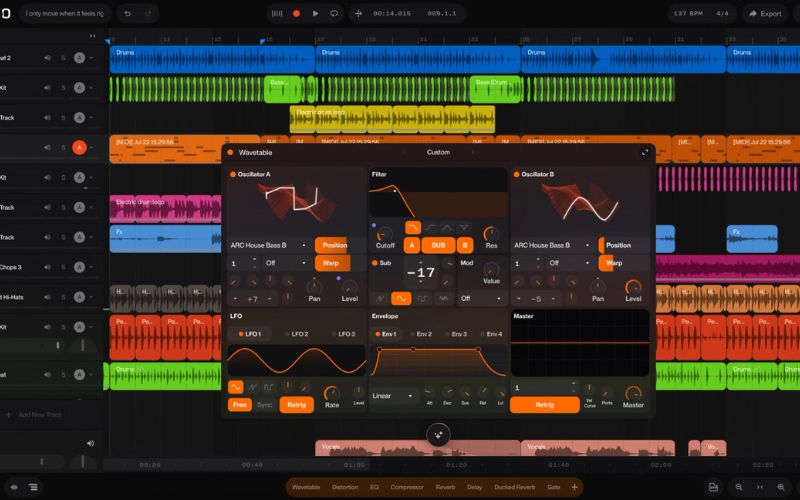
Premier offers more credits and access to Suno Studio, with tools for broader production work. It can fit if you develop multiple projects, test numerous variants or need to edit and work with separate stems.
Stems are separated audio parts, such as vocals and instruments, that make certain post‑adjustments easier. Consider Premier for the tasks it enables, in addition to the generation volume.
For an occasional song, much of that capacity may go unused. If you only need the top tier during a campaign, compare how much you’d pay to upgrade temporarily versus keeping it active all year.
How to save on Suno legitimately
You can adjust spending by preparing the project better and subscribing according to your work schedule. Before upgrading the plan, identify what’s limiting you: credits, downloads or a specific editing feature.
Organize the idea before you start generating. Having a revised lyric, an approximate duration and a defined style prevents spending attempts on changes you could have decided beforehand.
Use Free to learn and check if you like the output.
Record a representative week’s consumption.
Choose a plan that covers both generations and downloads.
Consider a paid month if the project has a fixed deadline.
Compare the annual plan when there is sustained use.
Review renewal at the end of the campaign or assignment.
If you check external offers, confirm which account you’ll use, who manages access and what conditions apply to your songs. The seller’s description should explain delivery; usage permissions also depend on Suno.
Monthly payment versus annual billing
Divide the total annual cost by twelve to obtain its equivalent monthly cost. Then compare that total with what you would pay during the months you actually plan to work.
Annual makes sense when you take advantage of the contracted period. Someone who creates every week may value the discount; someone preparing music for a single event might spend less by buying only the month they need.
Check the full amount, taxes and the renewal price. An ad that expresses the annual “per month” may refer to the equivalent cost of a prepaid charge, not to twelve independent payments.

Calculate the credits you need
Note initial generations and the adjustments you make until you approve a piece. Review the consumption shown in your account: the cost can vary by action or tool used, so don’t automatically convert a number of credits into a fixed number of finished songs.
Also measure how many results you will end up downloading. You may need many trials to select a few tracks; that pattern requires a different capacity than someone who exports numerous pieces with few tweaks.
According to the pricing information, subscription credits do not roll over from one period to another. Don’t overbuy thinking you can indefinitely save unused credits. Additional credits have their own conditions, which you should review before purchasing.
Do Suno prices vary by country or purchase channel?
The amount you see may depend on currency, taxes, the selected modality and the purchase channel. A screenshot from someone else does not confirm what you will pay from your account.
Compare the final total for the same plan and period. If you can subscribe from the web and from an app store, review both payment screens with your real data. Also check where you will manage cancellation.
If you look at a third‑party offer, add the access modality to that comparison. Activation on your account and access to an account managed by another person can have different conditions even if they advertise the same plan.
Affordable Suno versus its alternatives
Another tool might interest you if you need a different type of audio or a different way of editing. The most useful comparison is to complete a small task in each service and check which result you can use outside it.
Compare the exportable piece, not only the demo you hear. Before paying for an alternative, check whether it allows downloads, in which format and under what license.
Option | Practical test | What to check before subscribing |
|---|---|---|
Suno | Create a song with lyrics or an instrumental piece | Credits, downloads and commercial terms |
Udio | Contrast another interpretation of the same idea | Current export availability and rights |
Services called AI Music Creator | Identify the specific product and try its editor | Responsible company, limits and service license |
Stable Audio | Test music or sound resources for your project | Duration, editing, export and plan license |
Suno vs Udio: what to compare
Use similar instructions to hear how each tool resolves the lyrics, voice and structure. Assess clarity of the words and transitions between sections; a striking first impression may hide details you’ll need to correct.
Verify download availability before subscribing. Don’t assume a feature that appeared in an old comparison is still active. If the goal is to edit outside the platform, export is an essential part of the test.
Then estimate the work required to reach a valid result. The lower fee may stop being worth it if it demands many more attempts or does not allow you to complete the intended use.
AI Music Creator and Stable Audio
“AI Music Creator” is a generic name that can identify different products. Before comparing its price with Suno, locate the exact website, who provides the service and what the user receives with each modality.
Stable Audio lets you explore music and sound creation. It may be worth trying if you seek atmospheres, instrumental material or resources for a production. Choose the tool for the audio you need to obtain and confirm the conditions of the specific app or model.
If you will later incorporate that audio into a video, you can check options in CapCut. Video editing and music licensing are distinct issues: subscribing to the editor does not extend the permissions of the audio you import.
Which Suno plan to choose according to your goal
The choice starts with the destination of the song. Testing a lyric out of curiosity requires different access than preparing music for a campaign or working with several pieces each week.
Your goal | Plan to consider | What to check |
|---|---|---|
Explore styles and hear your lyrics set to music | Free | Daily credits and free access limits |
Create drafts for personal use | Free | Download availability and non‑commercial use conditions |
Prepare songs for videos, campaigns or clients | Pro | Authorized downloads, commercial permissions and included tools |
Generate numerous versions for multiple projects | Pro or Premier | Real credit consumption and how many pieces you need to export |
Edit in more detail and work with separate stems | Premier | Studio features and export conditions |
For commercial use, confirm that the song has an authorized download under the corresponding modality and complies with Suno’s other restrictions. The paid plan must cover both creation and the intended use of the result.
Keep files and relevant project receipts. If you buy access through a third party, clarify who controls the account and how your use is documented before relying on it for a delivery.
Before paying: checklist of price, credits and license
Review these points on the plan or offer page. Resolve doubts before depending on access for a delivery. Final amount, currency and contracted duration.
- Renewal date and cancellation channel.
- Credits included and cost of the actions you use.
- Download quota and Studio export conditions.
- Editing tools, stem separation and available formats.
- Access modality and control over account recovery.
- Commercial permissions for the song and the planned use.
- Support procedure if activation or access fails.
Consult Suno’s terms when you plan to use music commercially. They include specific restrictions, including for certain remixes, and do not guarantee that every generated result will have copyright protection.
Take the next step with Suno on CuentasGO
If you already have a lyric or a prepared project, check the Suno offers and compare available access. Review the advertised plan, duration and delivery method to choose an option that fits your schedule.
Allocate budget to the capacity you will use. If you need to try different versions or prepare several pieces, confirm limits before buying. A clear offer lets you organize the work more wisely from the start.
You can also review Canva to prepare a cover or visual materials to accompany the release. Add another tool only when it solves a specific task in your project, without accumulating fees you barely use.
