
Cheap shared subscription to DeepL Pro
Are you still paying the full price for DeepL Pro? Now you can get the best translation tool on the market at a ridiculously low price with the shared subscriptions we offer at CuentasGO. More natural, faster and more accurate translations than Google Translate… without breaking the bank.
Cheap DeepL Pro: how to save and when it’s worth it
For single phrases, vocabulary queries or informal emails, the free version is usually enough. It also lets you check how well DeepL Spanish handles the languages you use regularly.
Paying makes sense when translating stops being occasional. If every week you prepare product sheets, training materials or commercial proposals, DeepL Pro can save you many repetitive steps.
Free DeepLfitsoccasional use. Pro pays off when you work with recurring documents and terminology. If you need to adapt messages, create content or translate voice and images while traveling, another tool or a combination may suit you better.
ChatGPT and Claude help rephrase, summarize or adjust a message for a different audience. To translate full files without copying and pasting each block, a document-centered service is usually more practical.
How to get DeepL Pro cheap legally
Saving starts with not buying more than you need. A plan for multiple users, with advanced administration or surplus capacity is hardly worth it if one person only translates a few texts a month.
Payment modality also matters. To translate a website or finish a localization project over a few weeks, monthly billing gives more flexibility. When usage is steady all year, check whether annual billing reduces the effective cost.
Don’t resort to shared accounts, resold credentials or modified apps. Besides violating terms of service, they can expose budgets, contracts or client documents to people who shouldn’t see them. The same applies to any subscription: if you look for cheap premium accounts, do it only on platforms where you control access. Avoid from the outset:
- Pro accounts offered in forums, private groups or sites not affiliated with DeepL.
- Passwords shared with strangers.
- Extensions that promise to remove translation limits.
- Profiles created with third-party data or payment methods.
- Uploading confidential files to an account you don’t control.
The problem isn’t only that the account may stop working. Settings could be changed, access lost or sensitive documentation downloaded without your knowledge.
DeepL Pro price: what to check before subscribing
DeepL Pro pricing in Spain depends on the plan, billing period, country, taxes and included features. The valid reference is the price shown before you confirm the purchase, with VAT, renewal and cancellation conditions visible.
Old videos or comparison charts may be out of date. Rates, limits and even plan names change over time.
Aspect | What to check | Why it matters |
Payment method | Monthly, annual or available options | A lower monthly price may imply a longer commitment |
Final amount | Currency, taxes and total before purchase | Avoid calculating cost from the base fee alone |
Renewal | Date, price and cancellation conditions | Reduces the risk of renewing a plan you no longer use |
Usage limits | Texts, files, size or users | An economical plan can quickly fall short |
Included features | Documents, glossaries, style settings | Determines whether the subscription fits your workflow |
Product type | Individual, teams or API | The API and a manual subscription cover different needs |
If you want to integrate translation into a website, app or CMS, review the API separately. Its billing depends on consumption and may not match a conventional subscription price.
Monthly or annual payment: which fits better
A monthly plan offers flexibility. It may suit a school updating materials for a term, a company preparing an international catalog or a freelancer with a one-off localization project.
For weekly, sustained work, annual billing may be more reasonable. The discount stops being attractive if you sign up out of habit and barely open the tool after the first months. Before deciding, answer these three questions:
1. Do you need to translate every week or only during specific periods?
2. Will you work with full documents or short texts?
3. Does the annual saving compensate for losing some flexibility?
With irregular activity, paying a bit more for a specific month can be better than keeping a long-term commitment you don’t use.
Limits and costs that often go unnoticed
A document behaves differently from text pasted in a browser. A simple Word file, a presentation with text embedded in images and a scanned PDF require different processes.
Before relying on DeepL for documents, check supported formats, maximum file size and your plan’s limits. The most useful test is to translate a non-confidential document similar to the ones you handle daily.
Then open the translated file. Tables, footers, links and visual elements may need adjustment even if the text itself is well handled.
DeepL free vs Pro: differences that matter at work
When comparing DeepL free vs Pro, looking at a feature list alone isn’t enough. The free version solves many everyday tasks; the paid version adds value when it reduces mechanical work and helps keep consistency across documents.
Need | DeepL free | DeepL Pro or paid plan |
Quick queries | Usually sufficient | May be overkill |
Document translation | Depends on available limits | Check formats and plan capacity |
Repeated terminology | Requires more manual control | A custom glossary can help |
Team work | Less control over access | May include team options |
Sensitive information | Requires caution and condition checks | Plan guarantees should be validated |
Frequent volume | May fall short | Saves time if it avoids repetitive tasks |
Also consider time spent copying content, rebuilding tables, correcting recurring terms or locating the latest approved version of a phrase.
When DeepL free is enough
To understand an article, check a phrase or draft an informal message, DeepL free usually does the job. It also helps compare phrasings before writing.
It’s not worth paying for a subscription just to translate a phrase before a trip. Google Translate free, Microsoft Translator or an app with voice, camera translation and offline language downloads can be more useful in that context.
A comprehensible translation isn’t the same as a deliverable-ready text. If you use the tool to study, read the result, understand it and adapt it before presenting.
When a DeepL Pro subscription can be worthwhile
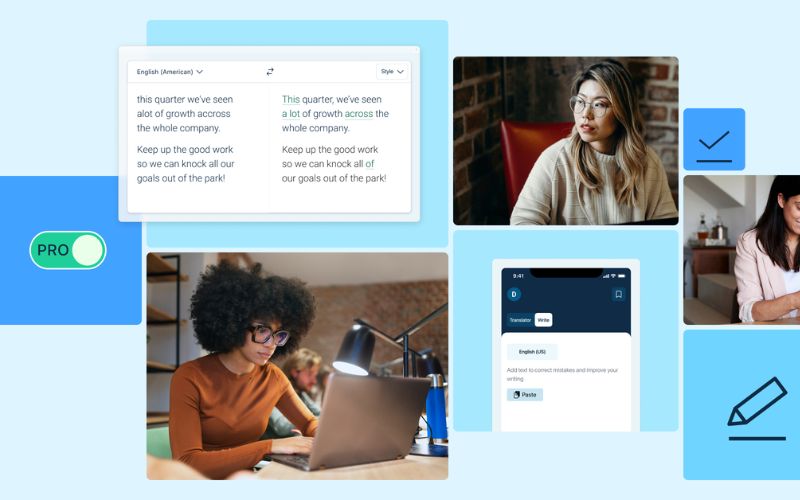
The subscription’s value appears when the same kind of work repeats: product sheets, reports for international clients or support documentation in several languages.
DeepL’s glossary helps keep the same translation for brand names, titles, technical parts or legal expressions. This avoids accumulated corrections, especially when multiple people are involved.
In marketing, machine translation is a starting point. You still need to review tone, references and commercial intent. A campaign can be grammatically correct yet sound unnatural to its audience.
Alternatives to DeepL: which tool to choose by task
There’s no single best online translator for every situation. Language pair, content type, confidentiality and expected outcome change the choice entirely.
Neural machine translation provides useful first drafts quickly. It doesn’t replace the judgement of someone who knows the product, industry and target audience.
Tool | Best use | Point to watch |
DeepL / DeepL Pro | Recurring texts and documents | Limits, formats and plan conditions |
Google Translate | Quick queries, travel and general comprehension | Review for professional or sensitive texts |
Microsoft Translator | Everyday use and Microsoft environments | Features depend on application or integration |
ChatGPT | Rewriting, tone, explanations and variants | Possible additions, omissions or interpretations |
Claude | Long texts, structure and stylistic polishing | Clear instructions and final review |
Linguee | Term lookup and usage examples | Doesn’t replace document translation |
Reverso | Vocabulary, examples and conjugations | Specialized terms need validation |
QuillBot | Rewriting and style improvement | Doesn’t cover professional translation alone |
DeepL vs Google Translate and Microsoft Translator
Google Translate and Microsoft Translator are free alternatives to DeepL that work well for understanding a message or preparing an informal communication. On trips they become more useful when combined with voice, camera or OCR translation.
Expectations change if the text will be published, sent to a client or included in a contract, commercial offer or technical manual. There, exact meaning, tone and the implications of each sentence matter more.
For a workflow with documents and repeated terminology, DeepL Pro may fit better. If use is light, you don’t need to preserve format and there’s no confidential content, free alternatives can cover the need without a subscription.
DeepL vs ChatGPT and Claude
ChatGPT and Claude are conversational tools. Besides translating, they let you ask for tone alternatives, summarize texts, adapt explanations for another audience or analyze why a sentence admits several versions.
This capability is especially useful in sales, communication and marketing. You can start from a technical message and request a clearer version, or ask for different calls to action for a specific audience.
Human review is still essential. The model may change a number, omit a condition or introduce an interpretation that wasn’t in the original.
ChatGPT Plus for translation and Claude Pro for translation are useful when the task mixes translation, writing and style review. Models and features change quickly, so test them with real, non-confidential texts.
If you’re interested in this route, at CuentasGO you can find access to AI tools like ChatGPT Plus at reduced prices, ideal for trialing without paying the full fee.
Complementary tools for specific cases
Linguee and Reverso don’t directly compete with DeepL for document translation. They work better as support to check word usage in context, spot overly literal equivalents or find common phrase examples.
MachineTranslation.com may interest you if you want to compare several engines. If each produces a very different rendering of the same phrase, pause and review the context before choosing.
For quick conversations or travel, Apple Translate, iTranslate, Papago or Yandex Translate may fit depending on language and device. Papago is often valued for certain Asian languages.
OCR covers another need: extracting text from signs, menus, screenshots or scanned documents before translating. If OCR misrecognizes a name or number, the error will carry to the next step.
Translating a website isn’t limited to visible content. Menus, forms, metadata, buttons, links, currencies and units are also part of the experience.
Translation quality: when human review is necessary
Translation quality depends on the language pair, clarity of the original and the context in which the text will be used. An AI translator can work well with simple instructions and fail with ambiguity, cultural references or a technical term with multiple meanings.
Human review gains importance when an error can affect a decision, a contractual obligation, someone’s safety or a brand’s reputation.
Not all texts carry the same risk
In a contract you must check defined terms, obligations, exceptions, amounts, dates, deadlines, jurisdiction and negations. A misinterpreted "unless" can completely change a clause’s scope.
Technical documents demand consistency too. Manuals, safety data sheets and software documentation must keep the same names for parts, commands and warnings. If a part receives two different translations, the user may end up looking for something that doesn’t exist.
In marketing, the challenge is less literalness and more adaptation. Tone, cultural references and calls to action are part of localization.
AI can speed up the first draft in all these cases. When the text has legal, medical, financial or reputational consequences, professional translation or specialist validation is needed.
Checklist before sending or publishing a translation
Reviewing isn’t about skimming and deciding the text "sounds fine". Compare it with the original and pay attention to points where most errors occur.
- Check proper names, brands, addresses, titles and acronyms.
- Review numbers, decimals, percentages, units, dates and deadlines.
- Look for negations, conditions, exceptions and ambiguous phrases.
- Verify product terminology is consistent throughout the document.
- Check links, buttons, footers, labels and cross-references.
- Open the final file and review tables, images, headings and page breaks.
- Read the target text as the person who will receive it would.
- If it affects health, finance, contracts or safety, request specialist review.
Privacy of DeepL and translating confidential documents
DeepL’s privacy must be evaluated according to the plan purchased, available settings and current terms. Being a well-known platform doesn’t alone determine which documents may be uploaded.
Start by identifying the content type. A public presentation doesn’t imply the same risk as a confidentiality agreement, a medical record or an HR report.
In an organization with security policies, a personal account shouldn’t replace an authorized tool. Know which providers are approved, who can access documents and what rules govern their handling.
Anonymizing helps when possible. If you only need to translate a text’s general structure, replace names, amounts, addresses and identifiers before processing.
If the document cannot leave the environment approved by the company or client, don’t upload it for testing. In that case, speed ceases to be the main criterion.
How to know if DeepL Pro is cost-effective
Consider the account this way: Real monthly cost = tool fee + review time + potential error cost. Then compare it with your current process. You may be spending time copying and pasting, rebuilding documents or fixing scattered terminology.
During one month, note what you translate and how long it takes. The relevant distinction is whether work arrives sporadically, weekly or daily, and which file type causes the most effort.
To assess a subscription, look at these factors:
- Approximate number of documents per month.
- Source and target languages.
- Typical formats: Word, PDF, Excel, presentations or web pages.
- People who need access.
- Time spent on the first draft and on review.
- Frequently repeated terms.
- Sensitivity of the information.
- Consequences of an error in that content.
Test several tools with a non-confidential text: a product sheet, a template email or a manual excerpt. This lets you measure fidelity, naturalness, formatting and correction time for a case similar to real work.
Sometimes a subscription removes much mechanical work. Other times the bottleneck is commercial adaptation, technical terminology or legal review. More machine translation capacity alone doesn’t solve that problem.
Why buy a cheap DeepL Pro account on CuentasGO
If you’ve read this far, you have the criterion: don’t pay for what you don’t use. That principle applies to your other digital tools too. On CuentasGO you can apply it easily.
The platformbrings together thousands of users sharing streaming subscriptions, productivity and AI services, with prices from €1.67/month on options like Microsoft 365 and access delivered in minutes.
The system is designed so you can buy with confidence: you can check each seller’s reviews before paying, and if something doesn’t work, the platform manages the claim and refunds you as site credit.
Saving on subscriptions doesn’t have to mean risking your money or data. Take a look at available offers and see how much you could stop paying each month.
